Structural analysis and professional reports — free, in your browser
StructureCalcs is five tools in one workspace: a beam calculator, a truss calculator, a frame calculator, a section calculator, and a full report builder. Analyze your structure, then write it up — with real equations, tables, and your results built in. No sign-up, nothing to install, and your work saves to files you own.

Now on Android
Free structural calculators, right in your pocket.
Five tools, one workspace
Five tools under one roof — all free, all in the browser. Solve the structure, then write it up.
Beam Calculator
Shear, moment & deflection
Continuous and simply supported beams under any combination of point, distributed, and area loads, plus applied moments — solved with the direct stiffness method.
- ✓ Unlimited spans, supports, and loads
- ✓ Fixed, pinned & roller supports; settlements & self-weight
- ✓ 2,600+ steel sections across 6 standards
- ✓ Interactive shear, moment & deflection diagrams
Truss Calculator
Member forces & displacements
2D pin-jointed trusses of any geometry under nodal loads, settlements, and fabrication errors — solved with the matrix stiffness method, determinate or indeterminate.
- ✓ Unlimited nodes, members, and supports
- ✓ Interactive canvas editor with snap-to-grid
- ✓ Statically determinate & indeterminate structures
- ✓ Force diagrams colored for tension / compression
Frame Calculator
NewPortal frames, sway & moments
2D rigid frames by the direct stiffness method — portal frames, multi-bay and multi-story frames, pitched roofs. The tool for a structure that resists load by bending its joints rather than by triangulation.
- ✓ Pinned, roller and fixed bases; support settlement
- ✓ Moment releases — model a shear connection honestly
- ✓ Nodal and member loads, in any combination
- ✓ Axial, shear and bending diagrams plus the deflected shape
Section Calculator
NewArea, centroid, I and Z
Cross-section properties for any shape you draw or place — a rolled section, a built-up plate girder, a box with a void, or a profile you trace yourself. Computed live as you draw.
- ✓ Area, centroid, Ix, Iy, Ixy and the principal axes
- ✓ Elastic and plastic section moduli, radii of gyration
- ✓ Draw plates, polylines and arcs; cut holes; combine regions
- ✓ Or place any of 2,600+ published steel sections
Report Builder
Write the report around your analysis
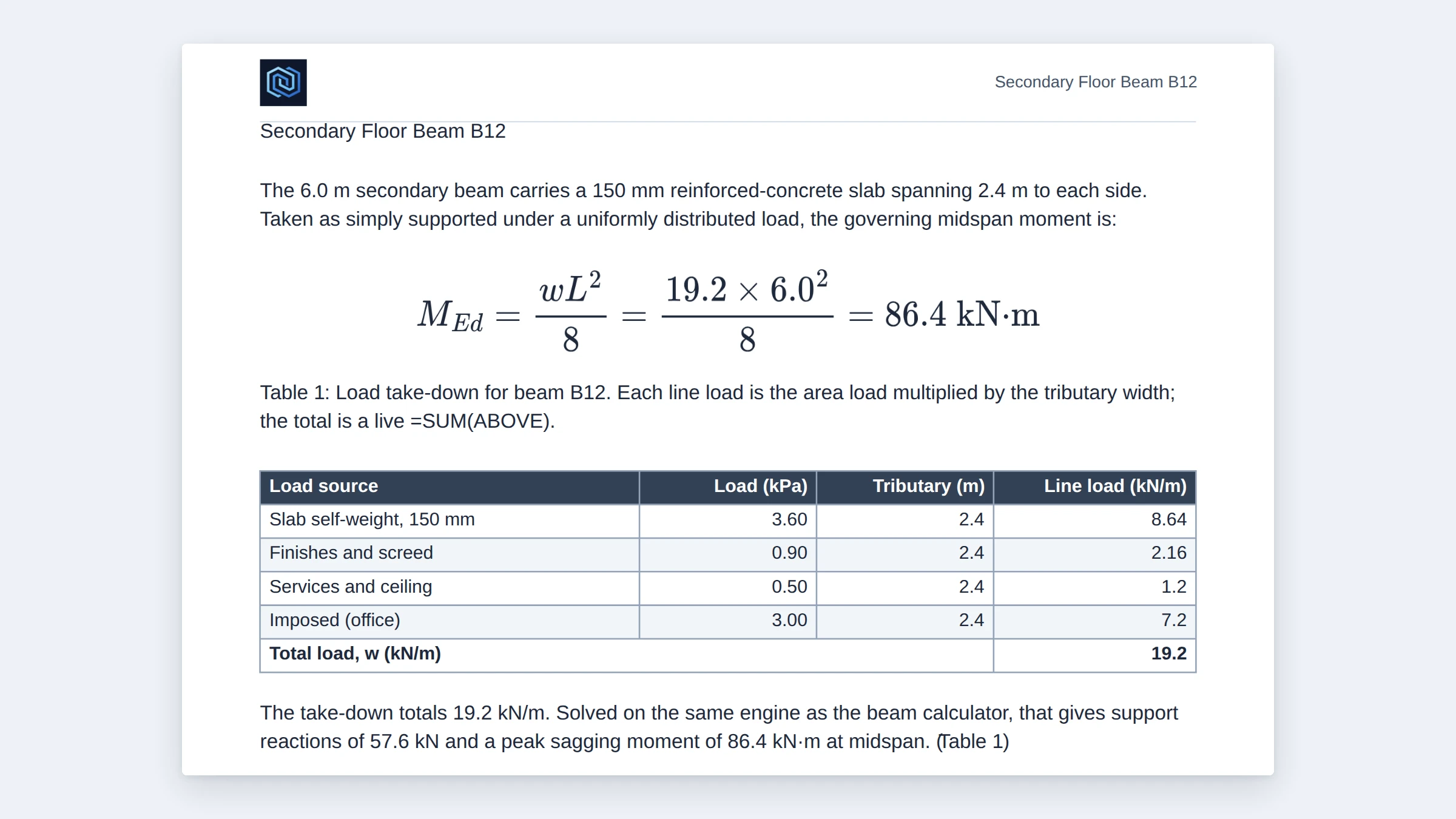
A full document builder — real equations, Word-class tables, and figures — with your beam, truss, frame and section results dropped straight in. What you see is exactly what exports.
- ✓ Word-style equation editor (~300 templates)
- ✓ Tables: merge, =SUM, ranges, paste from Excel
- ✓ Insert results and drawings from all four calculators
- ✓ Pixel-faithful PDF export — the preview is the print
The same solver, now over HTTP
Call the exact same engine from your own code with a clean JSON API — beam, truss, frame, cross-section properties and the steel library — and let AI assistants run it directly through MCP. Same answers as the calculators, plus rendered SVG diagrams, built for automation.
Why StructureCalcs?
Every feature is free, with no usage limits and no account. Model continuous beams with as many spans, supports and loads as the project needs; analyze trusses and rigid frames with unlimited nodes and members, determinate or indeterminate; work out the properties of a cross-section you drew yourself; and write the whole thing up in the report builder.
Nothing leaves your browser — every calculation runs locally, for instant results and complete privacy. Your work saves to files you own: reopen them any time, or share them with a colleague, supervisor, or classmate who opens the same file and continues.
It’s built by a structural engineer, for the way engineers and students actually work.
Key Features
Completely Free
Every feature is free with no usage limits. No account, no paywalls, no restricted tier — unlimited nodes, members, supports, spans, and loads.
Instant Results
Results update as you type — no waiting, no server round-trips. A Rust/WASM engine solves right in your browser.
Professional Reports
The built-in report builder writes up your analysis with equations, tables, figures, and a faithful PDF export — a document, not a screenshot.
SI & Imperial Units
Switch between metric (kN, m, mm) and imperial (kip, ft, in) at any time. Values convert in place, including published AISC imperial properties.
6 Steel Standards
2,600+ steel sections across AS4100, AISC, EN10365, BS4, JIS, and IS808. Pick one and its properties populate in the beam, truss and frame calculators.
Any Cross-Section
Draw a shape the catalogs do not have — plate girder, cover-plated beam, composite deck, a section with a hole — and get A, I, Z, S, r and the principal axes.
Frames, Not Just Beams
Portal and multi-story frames with rigid joints, moment releases, sway and base fixity — axial, shear and moment drawn on the frame itself.
Private & Offline
All calculations run locally in your browser — your models, inputs, and results stay completely private. Works offline once loaded.
Save & Share
Save your models and reports as files to reopen later or hand to a colleague or classmate — no lock-in, no expiry.
Dark Mode
Full dark mode across every page and tool — easy on the eyes during late-night study or a long report.
Student-Friendly
Built for engineering students: verify hand calculations, explore load patterns, and write capstone reports that look the part — all free.
What Is Structural Analysis?
Structural analysis is the branch of engineering that determines the effects of loads on physical structures and their components. Every building, bridge, tower, and machine frame must be analyzed to ensure it can safely carry the forces imposed on it — from the weight of the structure itself (dead loads) to the occupants, furniture, vehicles, wind, snow, and seismic forces it experiences during its lifetime (live and environmental loads).
The goal is to find the internal forces (shear, bending moment, axial force, and torsion) and deformations (deflections and rotations) at every point in the structure. Engineers compare these against the capacity of the members — set by the material properties and cross-section geometry — to verify the design satisfies the applicable building code or design standard.
The beam, truss and frame calculators here all implement the direct stiffness method (the matrix stiffness method), the foundation of virtually all commercial structural and finite-element software. By formulating equilibrium and compatibility as a system of linear equations and solving with matrix algebra, it handles determinate and indeterminate structures the same way, and copes with settlement, temperature and lack of fit — cases equilibrium alone cannot reach. The section calculator supplies the cross-section properties those analyses need, and the report builder turns the results into a document you can submit.
Steel Section Libraries
StructureCalcs includes a comprehensive built-in database of 2,600+ steel sections from six international standards, shared by the beam, truss and frame calculators:
- AS4100 (Australian, OneSteel 7th Edition) — 391 sections: UB, UC, WB, WC, TFB, PFC, UBP, EA, UA, CHS, RHS, SHS
- AISC (American, 15th Edition) — 1,687 sections: W, M, S, HP, C, MC, L, WT, MT, ST, HSS, Pipe, 2L
- EN10365 (European) — 296 sections: IPE, HEA, HEB, HEM, UPN, UPE, IPN, HD, HL, HP
- BS4 (British) — 103 sections: UB, UC
- JIS (Japanese, JIS G 3192) — 105 sections: H, I, C, L
- IS808 (Indian) — 104 sections: ISMB, ISHB, ISLB, ISMC, ISA
Selecting a section auto-populates Young’s modulus, second moment of area, cross-sectional area and mass per meter, and the drawing updates to the real depth. AISC sections carry published imperial values for accurate imperial display. When the shape you need is not in any catalog, draw it in the Section Calculator and use the properties it computes — or simply type your own, for any material or shape.
How It Works
1. Define your model. Enter geometry, material properties, supports and loads through the forms, or draw a truss, frame or cross-section directly on the interactive canvas. Pick a standard steel section or enter custom properties — with no limits on spans, supports, loads, nodes or members.
2. Get instant results. The engine solves as soon as the model is complete. Beams show reactions plus shear, moment, axial and deflection diagrams; trusses show member forces colored for tension and compression, with reactions and node displacements; frames draw axial, shear, moment and deflection on the frame itself; sections return area, centroid, I, Z, S, radii of gyration and the principal axes.
3. Write it up and export. Open the report builder and drop the results, diagrams and deflected shapes from any of the four calculators straight into a professional document — add equations, tables and headings — then export a pixel-faithful PDF. Save every model and report as a file to revisit or share. It all runs locally, so your data stays private.
Free Structural Tools for Engineering Students
StructureCalcs was built with engineering students in mind. Courses in structural analysis, mechanics of materials, and steel design have you solving beam, truss and frame problems by hand, then verifying with software.
You get unlimited beam spans, unlimited truss and frame nodes and members, indeterminate structures, a cross-section drawing tool, and 2,600+ steel sections — completely free, with no account or trial. The diagrams update in real time as you change inputs, which makes it an unusually direct way to build structural intuition and check hand calculations. 35 worked examples in the Learn section are solved in full by hand first, then checked against the solver — so you can see both halves.
And when it’s time to write it up, the report builder turns your analysis into a capstone or final-year report that looks professional — equations, figures, and tables included, exported to a clean PDF and saved to a file that’s yours to keep.
Learn the fundamentals
New to any of this? The Learn section has plain-English guides and worked examples — how to analyze a beam, a truss or a frame, reading shear force and bending moment diagrams, understanding steel section properties, and choosing which model a structure actually needs. Every guide is illustrated with real solved diagrams, not stock drawings: the figures come out of the same engine as the calculators.
Frequently asked questions
- Is StructureCalcs free and do I need to sign up?
- Yes, StructureCalcs is completely free with no account, no sign-up, and no usage limits. There is no paid tier, trial, or paywall: you get unlimited beam spans, unlimited truss nodes and members, all the built-in steel sections, and the full report builder without ever creating a login. There is also nothing to install, since it runs in your browser.
- Does StructureCalcs send my model or data to a server?
- No. The solver is a Rust/WebAssembly engine that runs locally in your browser, so your models, inputs, and results are calculated on your own device with no server round-trip. Your work saves to files that stay on your computer, and once the page has loaded the calculators even work offline.
- What can the StructureCalcs beam calculator do?
- The beam calculator analyzes continuous (multi-span) and simply supported beams using the direct stiffness method, with fixed, pinned, and roller supports plus support settlements and optional self-weight. You can apply point loads, distributed line loads (which can vary in intensity from one end to the other), area loads, and applied moments, with no limit on spans, supports, or loads. It returns support reactions and interactive shear-force, bending-moment, and deflection diagrams.
- What does the StructureCalcs truss calculator analyze?
- The truss calculator solves 2-D pin-jointed trusses of any geometry with the matrix stiffness method, handling both statically determinate and indeterminate structures. Every joint is idealised as a frictionless pin, so it computes axial member forces (colored for tension versus compression), support reactions, and joint displacements under nodal loads, support settlements, thermal effects, and fabrication/lack-of-fit errors. You build the truss on an interactive snap-to-grid canvas.
- Can StructureCalcs export a PDF report?
- Yes. The report builder produces a professional document with typeset equations, tables, figures, and your beam and truss results dropped in, then exports it as a pixel-faithful PDF where the on-screen preview matches the printed page. The beam and truss calculators can also export a PDF directly. You can additionally save the whole report as a downloadable .screport file to reopen later or hand to a colleague.
- Does StructureCalcs support both metric (SI) and imperial units?
- Yes, you can switch between SI units (kN, m, mm, GPa) and Imperial units (kip, ft, in, ksi) at any time, and displayed values convert in place. AISC sections carry their published imperial properties, so imperial display is accurate rather than just a converted metric figure. Your unit choice is remembered between visits.